Showing posts with label All Unlock Apple ID Solution Update. Show all posts

Wednesday, September 17, 2014

Unlock iOS 7 Find My iPhone Apple ID / Icloud Lost Password Remover *FAST* Service


Purchase this service now if your iPhone 4, 4S, 5, 5s or 5c is stuck on the activation screen if you don't remember your iCloud username and password, or if you purchased a used iPhone and the original owner does not want to provide you the iCloud email and password.

There is no need to ship your iPhone, we will never ask for it. We only need the IMEI of your iPhone and all is done remotely. Your purchase is 100% protected with PayPal so purchase with confidence!

This Unique Service is Available for a Limited Time Only so Act Now!

Please note that completion time will take approximately 3-10 working days. Please be sure that you or your client can wait.

This service will only work if the device is NOT reported missing/stolen.

They supplier requires a YouTube video (see example here) of your iPhone clearly showing the IMEI and the activation screen where the partial email is shown. Please upload a video to YouTube and include the link with your order to get $4.99 discount!

In iOS 7, a new security feature called Find My iPhone Activation Lock was added.


How does Activation Lock work?

When you enable Find My iPhone on your iPhone, iPad, or iPod touch running iOS 7, the Apple ID and password you use for iCloud is securely stored on Apple’s activation servers and linked to your device. From that point on, your password will be required before anyone can turn off Find My iPhone on your device, erase your device, or reactivate and use your device.

Activation Lock is enabled automatically when you turn on Find My iPhone in iOS 7, or when you upgrade to iOS 7 from a previous version of iOS that has Find My iPhone already turned on.

If you lost your device, turning on Find My iPhone on your iCloud account will enable the Activation Lock. Once this is enabled, the person who has your device will not be able to activate your device in any way.

Repeat order!

Limited Time Offer

Your purchase comes with a complimentary check to confirm whether iOS 7 Find My iPhone is enabled or not worth $2.95. We will proceed with your order if found enabled on the Apple database. Otherwise we will refund right away.


Tutorial Video Below


Order Find My iPhone Apple ID Activation
With BeijingiPhoneRepair

Monday, September 15, 2014

Before Icloud Password Remove Service with any online service


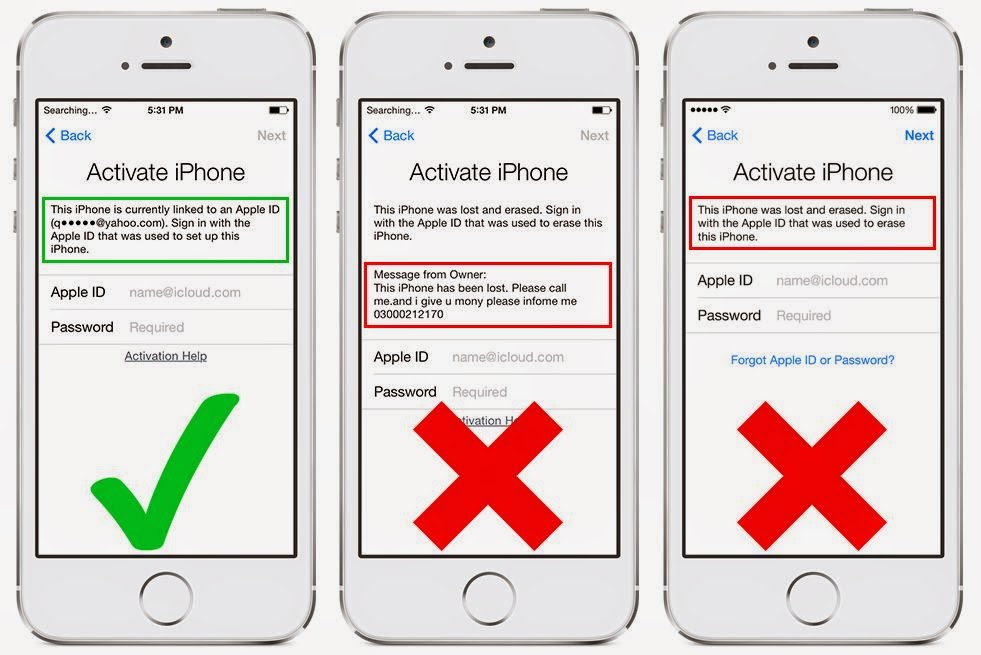
The all online service cannot unlock any devices in "Lost Mode" (see images below)
They have No cancellation after submit, even delay. and No refund for all "Lost Mode" orders.


The any online service to remove the Apple ID "Find My iPhone" lock, you can activate the device normally after unlocked.


Wednesday, July 23, 2014

Doulci Team Show Unlock Apple ID by Doulci Activator Software Update


 Thank you to credit Video From Doulci Team


Last April of this year has a hacker name is Doulci team can do bypass icloud password on the iPhone has iOS 7.0.x upgraded on iDevice

Tuesday, July 22, 2014

Remove Pattern Lock Screen on iOS 7.1.2 Jailbroken


     This solution will work on your iDevices has install Android Lock AT pattern lock screen
      And your iPhone or iDevice work on iOS 7.1.2 has to jailbreak 

Tuesday, July 15, 2014

How To Make Your Own Doulci Server


1. Download and install XAMPP

Before installing XAMPP please disable UAC.. antivirus and firewall to have a smooth installation.


2. Open file explorer and go to C:\xampp (or where you installed XAMPP)


Tuesday, July 8, 2014

Different method for Bypass icloud activation !

Silv3rCube Team made progress on a new method of iCloud bypass


most likely this bypass icloud video


Monday, July 7, 2014

Try New Magic line for bypass icloud on your iphone

Use this magic line  46.28.50.181 albert.apple.com


While keeping your idevice unplugged, connect to wi-fi and let it try to activate. Leave the iphone on iCloud login screen.
       
Connect your iDevice using the usb cable while using itunes with the modified hosts file like above.


Wait for your idevice to to be identified on iTunes.
when itunes show this put the ip in the host and save and click continue


If your phone will still be on the login screen as if nothing happened.
        
And put your iDevice in DFU mode.
        
(To enter DFU mode while the idevice is ON hold the Power Button for 3 seconds, and keep holding power while pressing the home button for 10 secs.)
       
Release Power Button and keep holding the Home Button.
        
Now your iDevice will show a black screen and iTunes will recognize the DFU mode.
        
Press “Restore Device” on iTunes, your device will restart and show the Apple logo with a loading bar below.
       
 Wait for the process to complete and finish restoring.

Friday, July 4, 2014

Unlock icloud Apple ID and Carrier Lock for iPhone 4 by Hardware Solution


It can make the iphone 4 into the factory pattern, and then the reason we developed "adapter dongle issue instructions to modify the mainboard serial number, make it match the baseband imei, can activate through itunes, so use ios7 smoothly, ios6, etc., such a repair is a thorough repair, do not need to escape, do not need to install the patch, can upgrade the ios!


This instrument repair, you can unlock iPhone4 phone, change the serial number,change 
IMEI, solution ID Lock, change the country, change colors, fix 3194 error,"Your iPhone 
has problems", "needs to be replaced," and other failures. 

Friday, June 20, 2014

How to disble Find my iPhone and delete apple id ?


How to disable Find My iPhone and delete Apple ID ?

1.Go to Settings> iCloud> Account> Password.
Then remove the password and type anything into the field Password.And press the Done button at the top  right.
It has a message that the password is wrong, don't interest the message, press OK, then press Cancel on the left.


2.Back to Settings> iCloud> Account again.delete the iCloud word from the  Description  box.Then press the Done button at the top right

3.Then back to main iCloud setting menu,The Find My iPhone is turned off.

4.Press Delete Account at the bottom Select Delete From iPhone

5.Now you can insert your Apple ID or register new account.


Thursday, June 19, 2014

Saturday, June 14, 2014

Update working IP address for Unlock Activation ID on you iDevice


Update working iP address for Unlock Apple ID on 10 - 15 June 2014

Unlock Apple ID on iOS 7 , 8 for your iPhone / iPAD / iPod


Thank you Racaox@CrokoM

Tuesday, June 3, 2014

The world's iCloud Server bypass Apple ID for iDevices

doulCi is the world's first Alternative iCloud Server, and the world's first iCloud Activation Bypass. doulCi will bypass and activate your iDevice for you when you are stuck at the Apple activation menu.
So, why would you use it? For example, if you have forgotten your Apple ID and password or no longer have access to your old iTunes


                                              Picture from AquaXetine


12421 Devices Bypassed in 5 minutes


 And Now they have Bypassed iOS 8 on iphone 5


For icloud bypass server ip you can follow

@cristigoiaro @AquaXetine @MerrukTechnolog


 How to Get doulci icloud server


Doulci bypass apple id video tutorial Video


Edit host for apple ip and use gadget wide for bypass idevices


Fix iPhone Activation Loop after Bypass Apple ID for icloud


If They are solution help you

Please Help doulCi if it helped you. Donate :)


We All Love doulCi.


All Video Solution For Repair iPhone